One of the most challenging aspects of creating BeatShot was coming up with a way to pseudo-randomly spawn targets without intersecting other targets. This by itself seems easy, but when targets can spawn with varying sizes and can move, it quickly becomes complicated.
Sphere Trace
When searching for valid Spawn Areas to spawn targets inside, the goal is to obtain a set of Spawn Areas where targets will not intersect or collide with targets that are already spawned. The general procedure is as follows:
- Trace a sphere with its origin at the bottom left vertex of the Spawn Area.
- Use vertices within the sphere trace to find corresponding Spawn Areas.
- Remove these Spawn Areas from consideration.
For each managed, activated, or recent Spawn Area:
Figure 1:
Equations for calculating $\text{R}_{min}$ and $\text{R}_{trace}$Figure 1 shows the equations used to derive the radius of the sphere trace, $\text{R}_{trace}$, at each iteration. We only care about the larger of $\text{R}_{current}$ and $\text{R}_{existing}$ since the maximum is the worst-case scenario. This value is rounded up to the nearest multiple of $\text{R}_{min}$ and multiplied by $2\sqrt{2}$ so that the diagonal vertices are included in the trace. Figure 2 walks through a visual representation of obtaining $\text{R}_{trace}$.
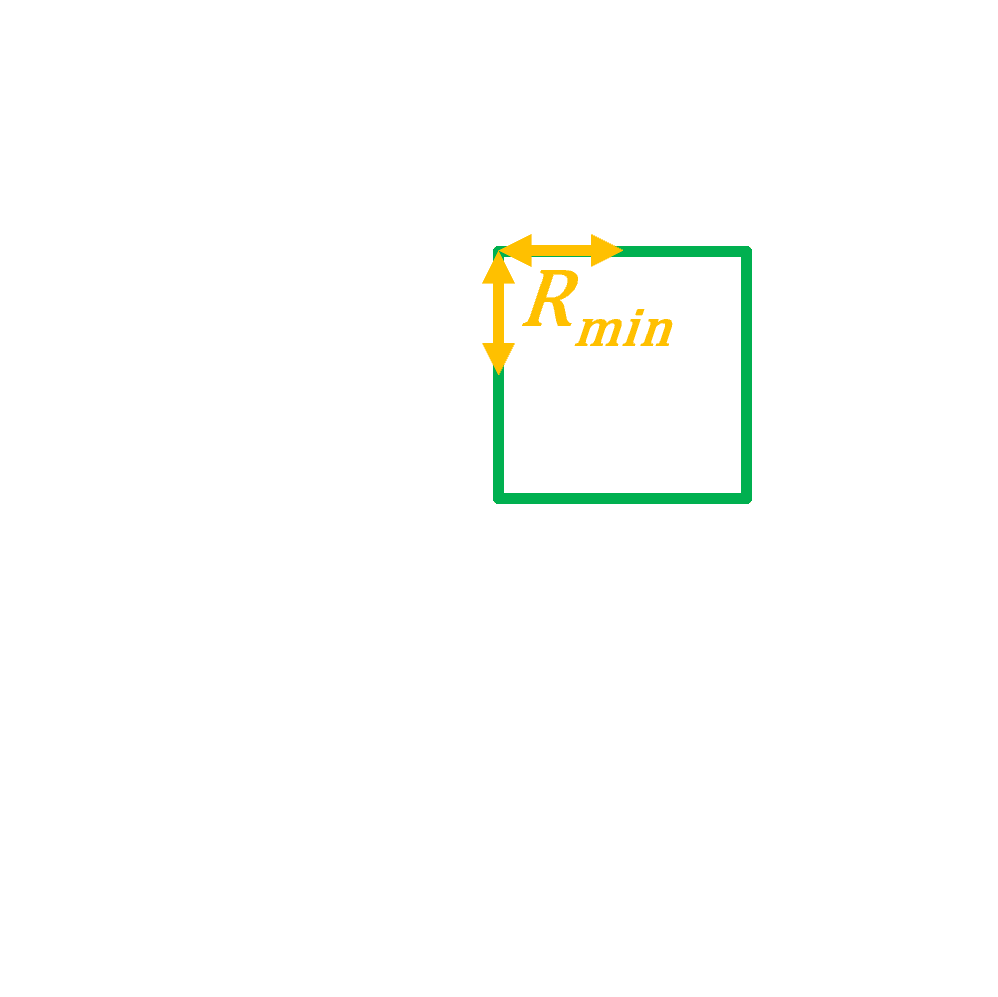
Figure 2.1:
The minimum radius, $\text{R}_{Min}$, is calculated using the existing Spawn AreaThe lower bound of the sphere trace is based on the Spawn Area dimensions, meaning that no matter the target radius, the trace will always capture at least nine vertices.
Figure 3 and 4 illustrate the difference between using the center and bottom left vertex as the sphere trace origin. Since a target may spawn anywhere within a Spawn Area, the center vertex approach causes a collision due to targets spawning near the edges of their Spawn Area. Using the bottom left vertex guarantees that targets will not collide due to spawning on the edges.
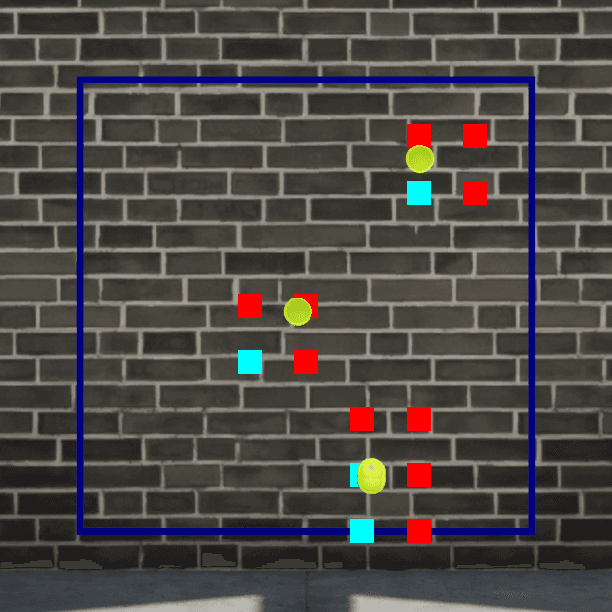
Figure 3:
Overlapping vertices generated using the center vertex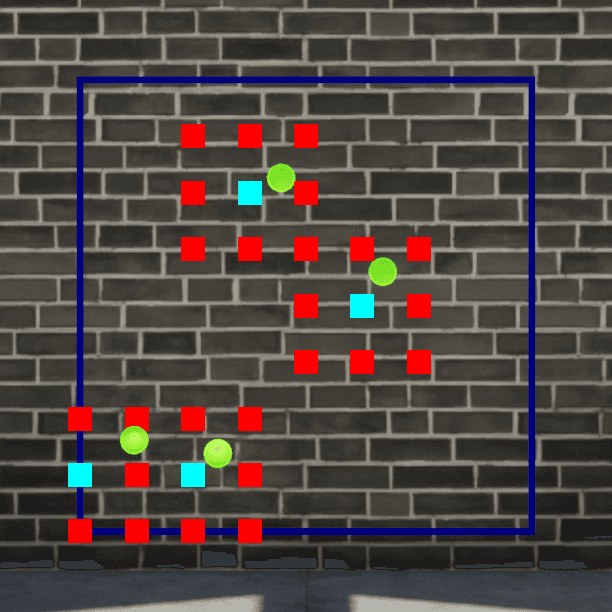
Figure 4:
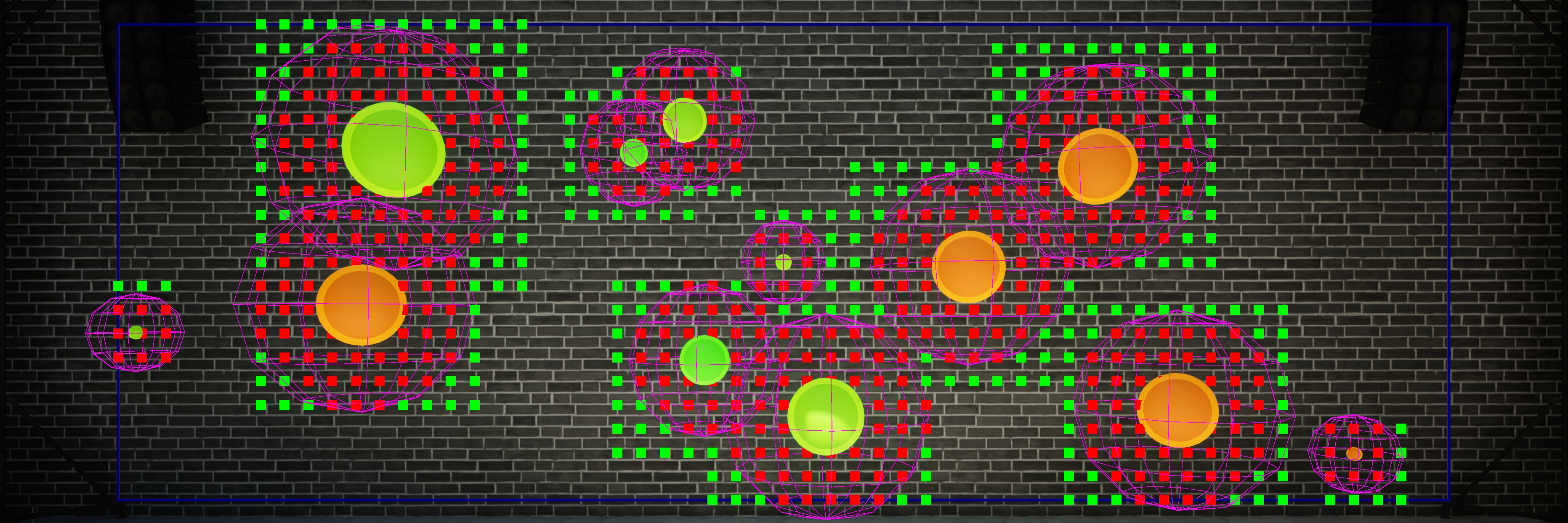
Overlapping vertices generated using the bottom left vertexFigure 5 shows what the results of the sphere trace look like in-game. The red points indicate vertices within the sphere trace, while the red boxes are the overlapping Spawn Areas. Green boxes represent non-overlapping Spawn Areas.
For smaller targets, the sphere trace looks more like a cube trace, but becomes more spherical as target size increases. The shape variation is also influenced by the chosen Spawn Area resolution. If Spawn Areas were 25x25 instead of 50x50, the spherical shape would be more apparent at the cost of increased computation resources. Green points denote vertices outside the largest target's sphere trace, while blue points mark the bottom-left vertices of Spawn Areas. Some of these points are not visible due to target size.
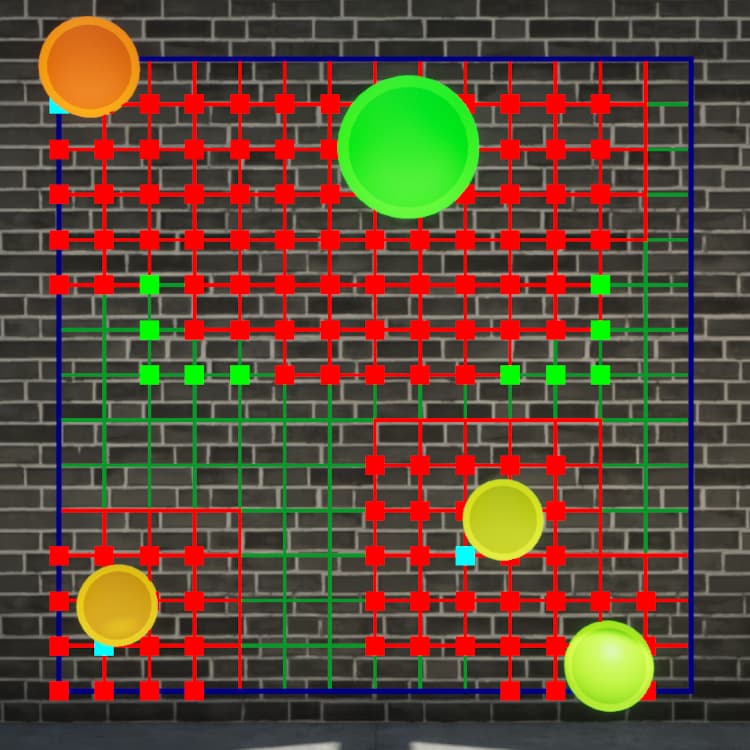
Figure 5:
In-Game Representation of Overlapping verticesIssues
- The method is conservative, always rounding up to the nearest Spawn Area dimension to account for the worst-case scenario.
- Sphere trace vertex generation is computationally expensive but could be pre-computed during initialization since there will only ever be a few sets of generated vertices due to rounding up and having a max target size.
- Duplicate calculations occur for adjacent Spawn Areas, though this is not a major concern as few targets are ever actually spawned at once.
Testing
Unreal Engine provides the Automation System for testing. The Automation test (FAutomationTestBase) is the lowest level of automated testing and operates outside of the UObject ecosystem. The common lifecycle functions that UObject classes depend on, such as all the target spawning system classes, aren’t executed without a world actor. Additionally, you can’t spawn actors without a world. To solve these problems, I created a class that inherits from FAutomationTestBase called FTargetManagerTestWithWorld.
Init creates the world, adds the package to the root, and creates a game world context. InitializeActorsForPlay and BeginPlay must be called in order for things to operate smoothly. The last function Init calls is InitTargetManager.
bool FTargetManagerTestWithWorld::Init()
{
    World = UWorld::CreateWorld(EWorldType::Game, false);
    UPackage* Package = World->GetPackage();
    Package->SetFlags(RF_Transient | RF_Public);
    Package->AddToRoot();

    FWorldContext& WorldContext = GEngine->CreateNewWorldContext(EWorldType::Game);
    WorldContext.SetCurrentWorld(World);

    InitialFrameCounter = GFrameCounter;
    World->InitializeActorsForPlay(FURL());
    World->BeginPlay();

    return InitTargetManager();
}
The blueprint version of the Target Manager class is loaded using StaticLoadObject. This is due to the fact that FTargetManagerTestWithWorld is a C++ only class deriving from FAutomationTestBase, which cannot be used with the reflection system. The Target Manager is spawned using the blueprint generated class and is added to the root set of actors to prevent garbage collection. DispatchBeginPlay is called to trigger the chain of events that allow the actor to sync with the UObject lifecycle functions.
bool FTargetManagerTestWithWorld::InitTargetManager()
{
    UObject* LoadedObject = StaticLoadObject(UObject::StaticClass(), nullptr, TargetManagerAssetPath);
    if (!LoadedObject)
    {
        AddError("Failed to load Target Manager");
        return false;
    }
    const UBlueprint* BlueprintClass = Cast<UBlueprint>(LoadedObject);
    const TSubclassOf<UObject> GeneratedClass = BlueprintClass->GeneratedClass;
    TargetManager = World->SpawnActor<ATargetManager>(GeneratedClass, TargetManagerTransform, FActorSpawnParameters());
    if (!TargetManager)
    {
        AddError("Failed to spawn Target Manager");
        return false;
    }

    TargetManager->AddToRoot();
    TargetManager->DispatchBeginPlay();
    TargetManager->ExecutionTimeDelegate.BindRaw(this, &FTargetManagerTestWithWorld::UpdateExecutionTime);

    return true;
}
Collision Testing
The FTargetCollisionTest class inherits from FTargetManagerTestWithWorld, and has two notable functions, GetTests and RunTest. The Automation Controller calls GetTests to populate the array of test names and commands. The Automation Controller will call RunTest using each of the test commands.
Inside GetTests, a data asset is loaded containing different BeatShot game modes to test. Each game mode name is added as a test name and command. The game mode name and configuration are added to a map that is iterating through during RunTest.
- HandleAudioAnalyzerBeat is manually called to spawn the targets.
- All targets that were spawned are obtained from the Target Manager.
- Primitive sphere objects are created to represent the targets, and the spheres are added to an array.
- Each target is told to destroy itself and treat it as if it were external damage.
- The world is ticked so that classes inheriting from UObject get a chance to tick.
- All spheres are tested for intersection against each other.
- The test verifies that all targets have been destroyed at the end of the iteration.
When RunTest is called, the temporary world is created and the configuration from the map is used to initialize the Target Manager. The following steps are performed during each of the 500 iterations:
Testing every single sphere against one another isn’t very efficient, but I didn’t want to add additional complexity and the calculation is simple and quick. After the iterations are complete, some additional information is added, the test variables are reset, and the world is destroyed.
Session Frontend
Automation tests can be run from the command line, inside the Unreal Editor, or inside an IDE. The code block below shows the command I use to execute the collision tests from the command line. The arguments ensure that no splash screen appears, no process window is created, the test output is logged, and only tests matching the name "TargetManager.TargetCollision" are executed.
The Session Frontend is the GUI for automation testing available in the Unreal Editor. Figure 6 shows the test browser after running the three different types of FTargetCollisionTest I created: All Sizes, Large, and Small. These are automatically populated by the Automation Controller when it calls GetTests. FTargetCollisionTest overrides the GetBeautifiedTestNamefunction so that the tests show up under the TargetManager → TargetCollision category.
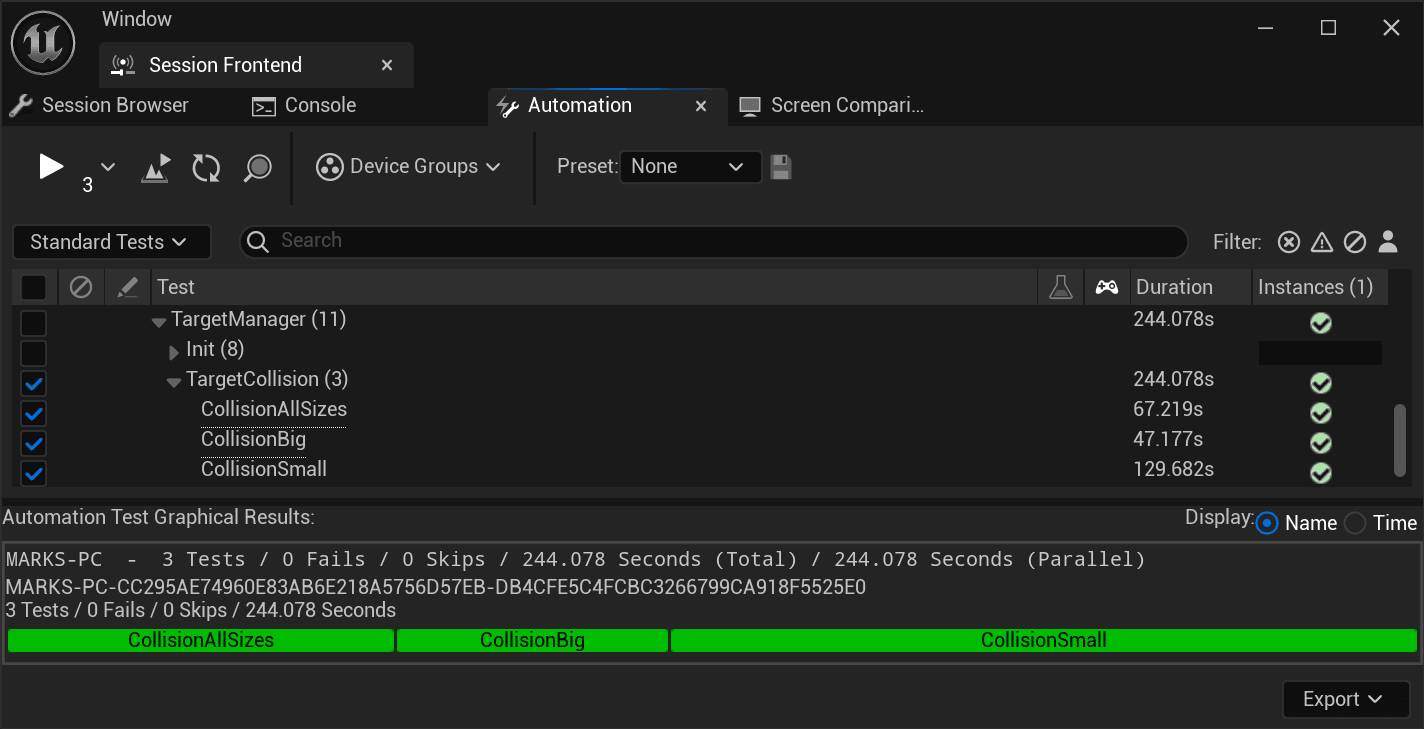
Figure 6:
Unreal Engine Session FrontendFigure 7 shows the console tab of the Session Frontend. The information I added at the end of each collision test is printed to the console after each of the three collision tests. Just over 147,000 targets were spawned across all three tests, which took around four minutes to complete. Targets are much more likely to collide when the target size is varied, as shown by the All Sizes test having the smallest minimum distance between two spheres of 1.57.
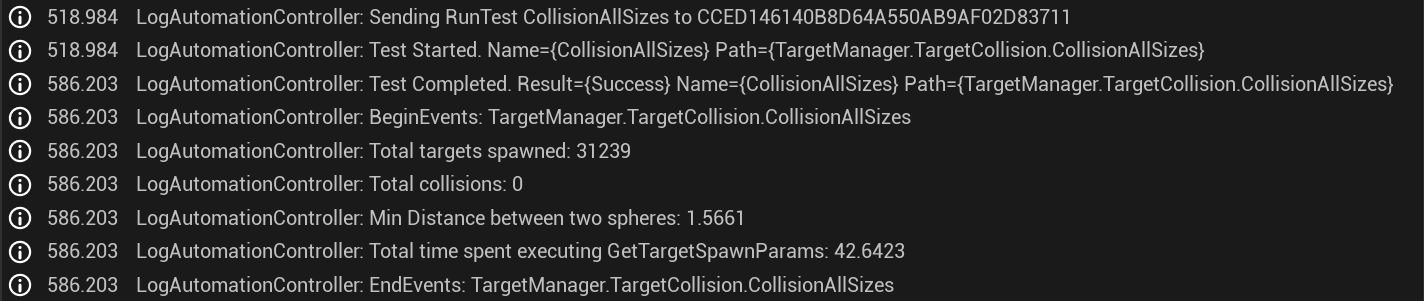

Figure 7.1:
Console Output From All Target Sizes Collision TestThe total time spent executing GetTargetSpawnParamsdoesn't tell us much about the results by itself, but when divided by the total targets spawned, it approximates the time taken to spawn each target. On average, All Sizes took 0.136 ms to spawn each target, Large took 0.497 ms, and Small took 0.096 ms. It make sense that larger targets resulted in longer execution times due more Spawn Areas being captured in the sphere trace.
Conclusion
Since no collisions occurred across over 147,000 target spawns and the minimum distance between two targets was relatively small, I conclude that the trace radius used during GetTargetSpawnParams is correct and minimal. There is certainly room for improvement and optimization but long as there are no collisions, I am satisfied.
Posted: July 21, 2024