From the Unreal Engine Docs:
The Gameplay Ability System is a framework for building attributes, abilities, and interactions that an Actor can own and trigger. The system is designed to be adapted to a wide variety of Gameplay-Driven projects such as Role-Playing Games(RPGs), Action-Adventure games, and Multiplayer Online Battle Arenas games(MOBA). Using this system, you can create abilities like a single attack, or add more complexity like a spell that triggers many status effects depending on data from the user and the targets.
It might not sound like the Gameplay Ability System (GAS) has a reason to be in BeatShot. Shooting a weapon could have easily been accomplished without a framework, and it was that way at first. However, I wanted to learn how an ability system worked in a game engine. GAS is a massive framework that was overwhelming at first. To make it less so, I narrowed my focus to a single goal: to create an ability for firing a weapon. After I completed this, I began to form a decent understanding of how the different classes worked together, which led to other abilities.
This article lays out exactly how I've implemented GAS in BeatShot. I've tried to be thorough so that recreating it would be as easy as possible. The first section gives an overview of any classes I created and their purpose. The titles of each section are links that take you to the code on GitHub. The second section provides a detailed timeline showing what actually happens during the game when a player shoots a weapon using the Fire Gun Ability.
I learned much of what I know about GAS from the Lyra Sample Project and the incredible GASDocumentation. I'm not looking to do the same thing here but instead show an example implementation and execution.
GAS Classes
Many of the classes that are part of GAS are meant to be subclassed in C++. In this section, I'll introduce each class that BeatShot either overrides or uses.
Note: The last five classes (UBSInputComponent through UBSHealthComponent) are NOT required for base GAS functionality, but provide enough benefit to warrant using them.
The Ability System Component (ASC) is added to any actor that wants to interact with GAS. For BeatShot, the only actors that have ASCs are the character and targets.
- ASCs on targets reside on the actor itself (ATarget).
- ASCs on the character reside in the Player State (ABSPlayerState).
In my implementation, the ASC lives in different places depending on the actor:
UAbilityTask
inherits from
UGameplayTask
It pains me to introduce this class before Gameplay Ability, but several of them use it so it should be introduced first.
A Latent Action in Unreal is a blueprint node that has at least one additional output execution pin that is called after some period of time. In other words, it lets you do certain stuff only after certain stuff happens. In the editor, they have a timer symbol on the top right of the node, but Blueprint Graph 1 does not show it.
An Ability Task can be used to perform a Latent Action from within a Gameplay Ability.
Unreal includes a couple default ones like UAbilityTask_PlayMontageAndWait, which is the first Ability Task shown in Blueprint Graph 1 and is used pretty much any time an animation needs to be played within a Gameplay Ability. It has four additional outputs corresponding to different events that can be executed depending on how the animation montage ended. The second shows AimToTarget, which the Aim Bot Ability uses and is discussed there.
Ability Tasks can be used in C++ and in blueprint. The additional output execution pins that appear on the blueprint node are executed using delegates in C++. In C++, a task is created by using a static factory function that instantiates the task. After this, the task delegates can be bound to. In C++, ReadyForActivation must be called, but does not have to be called in blueprints.
Blueprint Graph 1:
Two Ability Tasks inside the Fire Gun Ability's ActivateAbility event. The second is only shown for reference and is not executed.A Gameplay Ability (GA) is an action or skill that an actor can perform in game.
There isn't much to the base override besides setting up how the ability is supposed to be activated (ActivationPolicy) and interact with other abilities (ActivationGroup).
This is the ability for shooting the gun in a game mode that uses Hit-Based Damage. This is the ability used in the Timeline Section, so I won't go in depth here.
This is the ability for dealing damage to targets for a game mode that uses Tracking Damage. Most of this class is implemented in C++. OnTargetDataReady is the only event/function used in the blueprint version of this ability.
Since all of the elements in Blueprint Graph 2 are likely unfamiliar at this point, I'll provide a basic overview of what happens in this ability and leave the in-depth explanation to the OnTargetDataReady Section:
- The Ability is given to the character by the game mode and is immediately activated since the ActivationType is OnSpawn.
- The UBSAT_TickTrace Ability Task is created. Its OnTickTraceHit delegate is bound to the OnTickTraceHitResultHit function.
- When OnTickTraceHitResultHit is called, the HitResult is packaged into Target Data and eventually the OnTargetDataReady event, shown in Blueprint Graph 2, is called.
- After passing some checks, the hit actor from the HitResult is cast to a BP_Sphere_Target, which is the blueprint class for an ATarget.
- If the cast succeeds, the player who owns this ability has their crosshair on the target. Tracking damage is applied to the target and the target color is changed to green.
- If the cast fails, the player who owns this ability does not have their crosshair on the target. No damage is applied and the OnPlayerStopTrackingTarget delegate is broadcast to ATargetManager so that it can change all target colors to red.
Bluprint Graph 2:
The blueprint portion of the Track Gun AbilityThe purpose of this task is to broadcast a HitResult from a LineTraceSingleByChannel every frame. I chose to use an Ability Task here because it can tick using TickTask, while a GA cannot.
Usually, Ability Tasks are ended pretty quickly, but this task is active as long as the Track Gun Ability is active since it doesn't make much sense to create and destroy a task every frame. I'm not sure if this is an intended use for an Ability Task, but it does the job.
Before BeatShot's trailer was edited, I needed footage of the game in action but didn't want to worry about performing well during every footage take since there was a lot to record. This ability was created in response to this. It provides automated aiming to targets and looks decently realistic. It can handle all Hit-Based Damage game modes and is implemented in C++ only.
This ability is given to the character using a console command. It's common for Cheat Manager classes to manage console commands, and that's exactly what UBSCheatManager does.
- When the Aim Bot console command is executed, the CVarOnChanged_EnableAimBot function is called.
- This function binds the OnTargetActivated_AimBot delegate located in ATargetManager to the OnTargetSpawned_AimBot function located in ABSCharacter.
- It also gives the ability to the Character using the GiveAbilityfunction on Character's ASC.
- The ability is immediately activated since the ActivationType is OnSpawn.
- Inside ActivateAbility, the OnTargetAddedToQueuefunction is bound to the owning Character's OnTargetAddedToQueue delegate.
- Each time a target is activated by the Target Manager, the Character adds a target to the head of a queue and broadcasts its OnTargetAddedToQueue delegate, which calls the OnTargetAddedToQueue function in the ability:
- This function calls PeekActiveTargetson the Character. This returns a pointer to the queue's tail item without removing it from the queue.
- If the queue is empty, a null pointer is returned, and nothing happens inside the ability. If the queue has invalid pointers, it is emptied.
- If a valid pointer to a target is returned, the ability creates a new UBSAT_AimToTarget task and binds to its OnCancelled and OnCompleted delegates. ReadyForActivation is called to activate the task.
- When either the OnCancelled or OnCompleted delegates are broadcast from the task, PopActiveTargets is called on the Character which removes the target from the tail of the queue.
- The queue could have been stored anywhere but it ended up on the character since it's easy to access from the ability.
The main reason I chose to use an Ability Task for the Aim Bot ability is because it can tick using TickTask, while a GA cannot. Tick is needed here because the control rotation of the character needs to be lerped smoothly across frames.
This task takes a few parameters from the ability that creates it:
- A UCurveFloat is used to read the value from a curve on tick. This is done using a FOnTimelineFloat delegate and the curve. The OnTimelineTick function is bound to the FOnTimelineFloat delegate, so every time the timeline ticks, the value from the curve is passed as a parameter to this function.
- The target (ATarget) to aim toward
- The timeline playback rate
An FOnTimelineEvent is used to bind the timeline completion to the OnTimelineCompleted function. When the task is activated, the timeline is played from the start. TickTimeline is called from TickTask as long as the task state is active.
Inside OnTimelineTick, SetControlRotation is called to update the controller rotation every frame.
- GetActorEyesViewPoint is called to get the current location and rotation of the player controller.
- The new controller rotation is found using UKismetMathLibrary::RLerp with the following parameters:
- Start rotation: rotation obtained from GetActorEyesViewPoint
- End rotation: found using UKismetMathLibrary::FindLookAtRotation with the following parameters:
- Start location: location obtained from GetActorEyesViewPoint
- End location: current location of the target
- Alpha: the function parameter which is value from the curve
When the timeline finishes playing, the OnCompleted delegate is broadcast, and the task is ended.
An Attribute Set is a group of stats that an actor with an ASC has. BeatShot has several attributes, including Max Health, Health, Hit Damage, Tracking Damage, and Total Damage.
The first four are regular attributes that are replicated, while Total Damage is considered Meta attribute. Meta attributes only exist on the server and are used in BeatShot to calculate the damage that should be applied to a target.
- In my implementation, attribute sets live in different places depending on the actor:
- Attribute sets on targets reside on the actor itself (ATarget).
- Attribute sets on characters reside in the Player State (ABSPlayerState).
FBSAttributeEvent is a delegate that I created that broadcasts any time an attribute is changed. Health and MaxHealth both have one of these delegates (OnHealthChanged and OnMaxHealthChanged ), but the damage attributes do not.
Gameplay Effects
Gameplay Effects (GEs) are a critical part of GAS, but they are not subclassed. I’ll share the description from the GAS Documentation:
GameplayEffects (GE) are the vessels through which abilities change attributes and Gameplay Tags on themselves and others. They can cause immediate attribute changes like damage or healing or apply long term status buff/debuffs like a movement speed boost or stunning. The UGameplayEffect class is a meant to be a data-only class that defines a single gameplay effect. No additional logic should be added to GameplayEffects. Typically designers will create many Blueprint child classes of UGameplayEffect.
Any damage that is dealt in BeatShot is applied using an instant duration GE. This is discussed further in the UBSDamageExecCalc section.
Duration and Infinite GEs have the option of applying periodic effects, which are treated like Instant GEs that occur at fixed intervals. These are set up using timers.
Target Immunity
GEs have a property called Granted Application Immunity Tags which grants the owner immunity to all matching GAS that have the same Ability Tag.
Game modes that use Hit-Based damage spawn targets with immunity to the Tracking Ability (and consequently Tracking Damage). These targets will have the corresponding Ability Tag of Ability.Track in their Granted Application Immunity Tags.
Targets can also be immune to all damage, such as before a game mode starts or if a Target Activation/Deactivation Response involves removing or applying immunity. These various types of immunity are applied using infinite duration GEs and are typically called directly on the target itself using ApplyGameplayEffectToSelf.
Fire Cooldown
To apply a cooldown to the Fire Gun Ability, or basically fire rate, a duration-based GE is supplied to the GA blueprint property Cooldown Gameplay Effect Class. This GE has the following blueprint properties:
- Duration Policy: Has Duration
- Scalable Float Magnitude: fire rate of the weapon
- Granted Tags: Data.Cooldown is added
I use a generic universal cooldown Gameplay Tag called Data.Cooldown but that might change in the future.
I chose to implement this class simply because I found the BindAbilityActions function in the Lyra Sample Project. This function allows abilities to be bound to an Input Action using an Input Tag. These mappings are done through the data asset UBSInputConfig.
This data asset maps each Input Action to an Input Tag, which is just a Gameplay Tag. Input Tags are used so that Input Actions can be bound to abilities that might not yet be granted. All Input Actions are bound to functions inside the ABSCharacter class and are bound during InitializePlayerInput. This data asset splits Input Actions into two categories:
- Native Input Actions are things like look, move, and walk. They are not tied to an ability. Each of these are bound to unique functions.
- Ability Input Actions are bound to specific abilities. All of these are bound to the same functions: Input_AbilityInputTagPressed and Input_AbilityInputTagReleased.
Each GA blueprint that requires input from the user contains the Input Tag in the bluprint property Ability Tags. For example, the Fire Gun blueprint Ability Tags are Ability.Fire and Input.Fire. As shown in Figure 1, the Input Tag for the Input Action associated with firing the weapon is also Input.Fire.
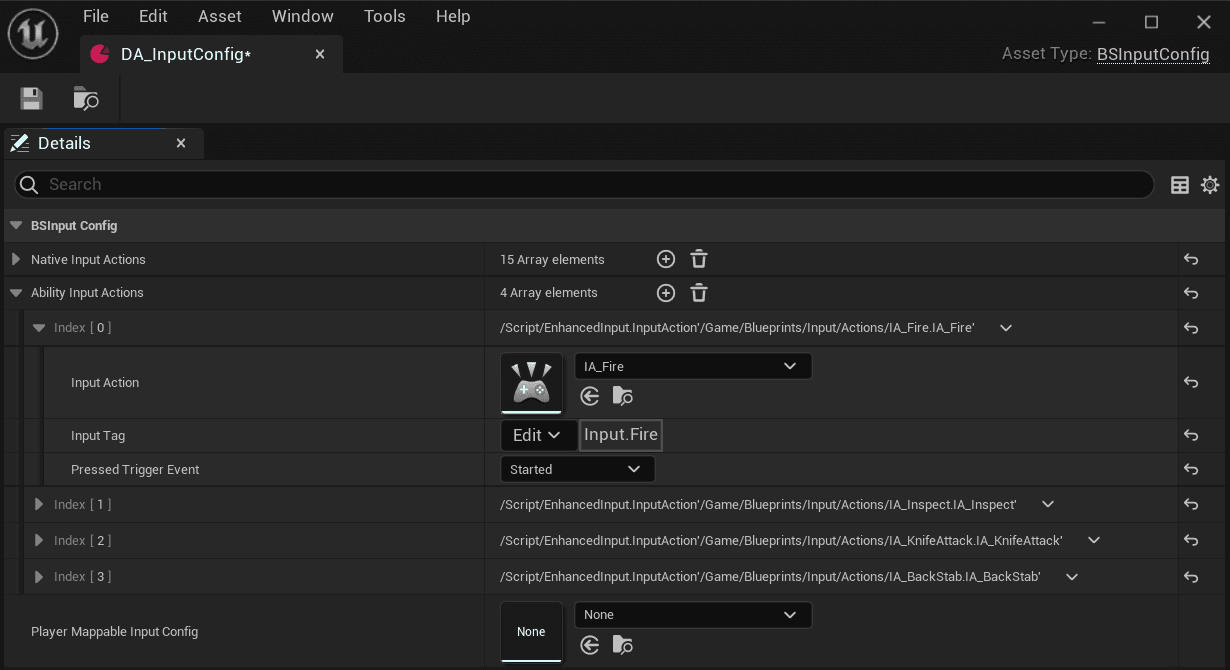
Figure 1:
The input configuration for a character in BeatShot.An Ability Set is a group of Gameplay Abilities, Gameplay Effects, and Attribute Sets. This isn't strictly necessary to implement, but it makes it easier to grant and remove a large number of GAS and GEs that use various Attribute Sets.
GiveToAbilitySystem handles granting all components of this class to the specified ASC and TakeFromAbilitySystem handles their removal.
A GA is granted by creating an FGameplayAbilitySpec and calling GiveAbility on the ASC. This returns an FGameplayAbilitySpecHandle, which is stored so that it can later be used to remove the GA using ClearAbility.
Similarly, a GE is applied by creating an FGameplayEffectSpec and calling ApplyGameplayEffectToSelf on the ASC. This returns an FGameplayEffectSpecHandle, which is stored so that it can later be used to remove the GE using RemoveActiveGameplayEffect.
An Attribute Set is granted by creating a new Attribute Set object and calling AddAttributeSetSubobject. This returns the added Attribute Set, which is stored so that it can be later used to remove the Attribute Set using RemoveSpawnedAttribute.
Figure 2 shows the Ability Set that is granted to the character when the knife is equipped. The Input Tag is not strictly necessary since all the abilities already have it in their Ability Tags.
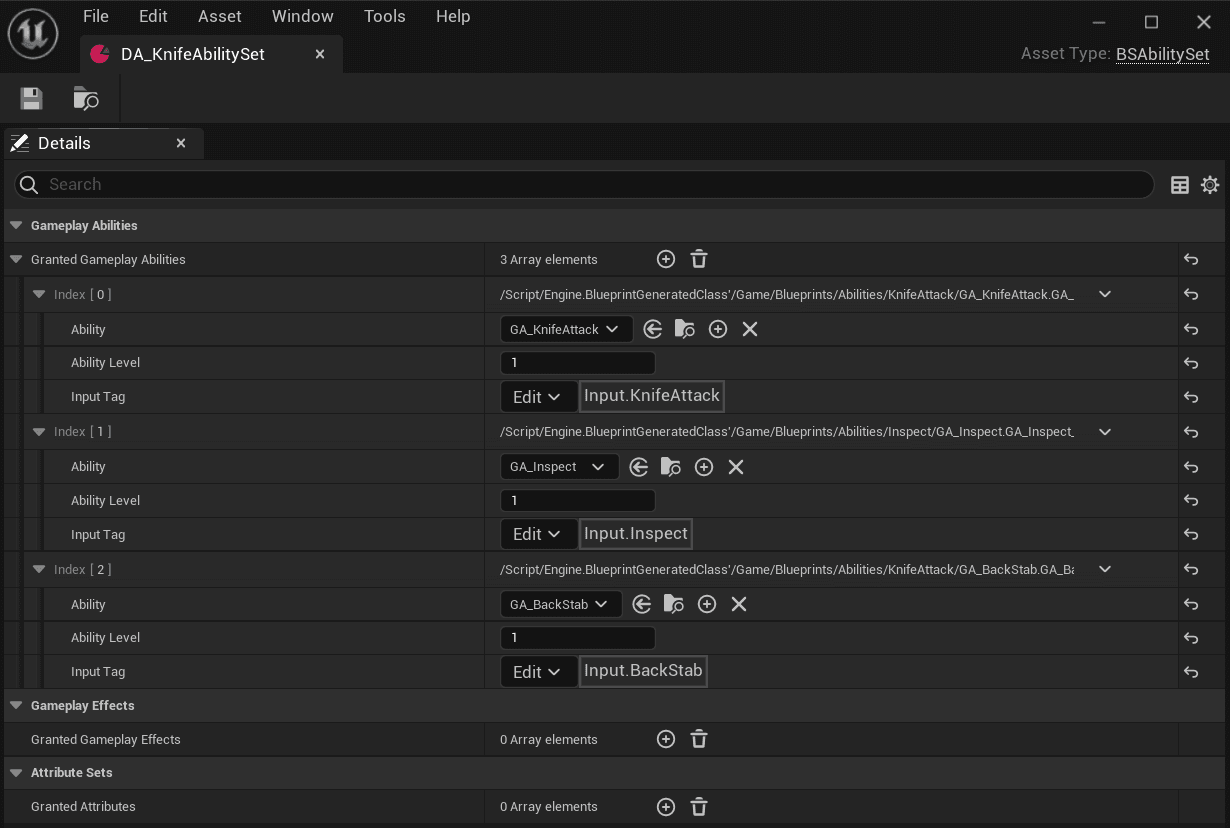
Figure 2:
The Ability Set for the when the character has a knife equipped.Instead of just "Apply 100 damage by removing 100 health points", a Gameplay Effect Execution Calculation ( Execution) lets you execute additional calculations, such as snapshotting various attributes from both the source and the target. Examples could include taking armor, shield, or resistances into account to get the final damage value to be applied. It also gives access to both the source and target Gameplay Tags.
This component is added to any actors where keeping track of their health is important. In this case, it is only added to targets.
To be honest, the Health Component is kind of unnecessary since the target could just bind to the UBSAttributeSetBase's OnHealthChanged delegate directly, but if I wanted to add additional actors that use Health Components in the future, it would be less coding in the long run.
Timeline
For this section, I detail what happens when the player in BeatShot shoots a target in a Hit-Based damage game mode, starting from when the player presses the IA. This means that the GA used throughout this section will always be UBSGA_FireGun.
Input
- Player presses the key or mouse that is bound to an Input Action.
- Input_AbilityInputTagPressed is called on the character, which simply calls AbilityInputTagPressedon the character's ASC. If the ASC finds an activatable GA with the matching Ability Tag, the Gameplay Ability Handle is added to the member variable InputPressedSpecHandles. These get processed in ProcessAbilityInput. This function is called from the player controller inside PostProcessInput.
Ability Activation
- If an activatable ability was found in the ASC, TryActivateAbility is called, which begins a series of internal function calls that eventually end up calling ActivateAbility on the Fire Gun Ability.
- The C++ version of ActivateAbility doesn’t do anything noteworthy but the blueprint version calls StartTargeting, which is implemented in C++ and is discussed in the next section. It also calls the PlayMontageAndWait Ability Task to play the Animation Montage for the weapon recoil.
StartTargeting
- This function's main purpose is to create the structure that holds the targeting data. This comes in the form of an FGameplayAbilityTargetDataHandle, which holds an array of pointers to FGameplayAbilityTargetData.
- FGameplayAbilityTargetData allows passing data across the network. GAS comes with several subclassed versions, but the one used here is FGameplayAbilityTargetData_SingleTargetHit since it allows passing a HitResult.
- The HitResult is obtained by calling SingleWeaponTrace, which traces a single line using a collision channel I created that ignores any pawn or weapon meshes. The start of the trace begins at the player’s Camera Component, some maths are done to find end location, and UWorld::LineTraceSingleByChannel is called to get the HitResult.
- The last thing StartTargeting does is call OnTargetDataReadyCallback.
OnTargetDataReadyCallback
- This function does some more networking stuff like creating a ScopedPredictionWindow and RPC the target data to the server, but I'm no expert on these topics since I just copied them from the Lyra Example Project.
- CommitAbility is called on the GA. This is where any cooldowns or costs associated with the ability are checked. The cooldown for FireGun is the same as the weapon’s fire rate, but there is no cost to firing the weapon since BeatShot’s weapons have unlimited ammo. If CommitAbility returns false, the ability is ended, otherwise OnTargetDataReady is called.
OnTargetDataReady
- This event/function is implemented in blueprint and shown in Blueprint Graph 3.
- The FGameplayAbilityTargetDataHandle is the only parameter passed to this function, which is what StartTargeting created earlier.
- If the HitResult contained a blocking hit, an FGameplayEffectSpec ( GESpec) is creating using MakeOutgoingGameplayEffectSpec with the input GE containing the blueprint properties:
- Duration Policy: Instant
- Executions: The C++ class BSDamageExecCalc is added
- ApplyGameplayEffectSpecToTarget is called using the GESpec and target data.
- The ExecuteGameplayCueWithParamsOnOwner function is called using the HitResult as a parameter and the Gameplay Cue Tag of GameplayCue.FireGun. The Gameplay Cues section goes over what happens when this is called.
- EndAbility is called after execution of the GE and Gameplay Cue.
Blueprint Graph 3:
::UBSGA_FireGun::OnTargetDataReadyApplying The Gameplay Effect
A GESpec is essentially just a modifiable instance of a GE since a GE is a data-only class. Inside its Initialize function, it sets the context and performs other prep-related tasks. One of these tasks is calling CaptureDataFromSource. This informs the GESpec which attributes to capture from the source. This can be called multiple times depending on source target setup. Target attributes are captured later in execution.
There's actually three ApplyGameplayEffectSpecToTargetfunctions that are called since we're starting from a GA. It starts with the one owned by the GA and then calls the FGameplayAbilityTargetData version, which duplicates the GESpec and context. Then it calls the ASC version for each targeted actor, but there will only be one in this example.
ApplyGameplayEffectSpecToSelf
ApplyGameplayEffectSpecToTarget is just a convenience function that calls ApplyGameplayEffectSpecToSelf using the target ASC parameter. In this example, it’s the ATarget’s ASC.
- For all GE Duration Types, Application immunity is checked and the chance to apply the effect is calculated (always 100% in this example). Application Tag Requirements, Removal Tag Requirements, and Custom Application Requirements are also checked (none here).
- The major difference between Instant and all other Duration Types is that Instant GEs are not applied but instead executed through ExecuteGameplayEffect. All other types instead call ApplyGameplayEffectSpec on the FActiveGameplayEffectsContainer. ExecuteGameplayEffect is detailed in the next section.
- Any effects that should be removed on application of this GE are removed.
- The source OnGameplayEffectAppliedToSelf and the target OnGameplayEffectAppliedToTarget delegates are broadcast.
- Target attributes are captured using CaptureAttributeDataFromTarget.
- Any Modifiers and Executions on the GE are executed.
- As previously mentioned, BeatShot uses two types of damage: Hit and Tracking. These attributes are snapshot from the source (damage causer) during initialization of the of a GESpec.
- The GE created earlier uses the Execution UBSDamageExecCalc. Execute_Implementation is where the calculation takes place.
- The source and target Gameplay Tags are accessed to tell which kinds of immunity, if any, the target has. If the target is immune to Hit Damage, the Hit Damage attribute that was captured from the source is not used in the damage calculation. Similarly, if the target is immune to Tracking Damage, the Tracking Damage attribute is not used.
- The calculation adds an Output Execution Modifier that sets the value of the Total Damage Meta attribute. This directly modifies the attribute on the target ASC.
- After the GE is executed, PostGameplayEffectExecute is called on the target Attribute Set. The input parameter FGameplayEffectModCallbackData describes which, if any, attributes were changed by the GE. In this example, the Total Damage attribute will appear modified. Then, the Health attribute is set to its current value subtracted by the value of the Total Damage attribute. The OnHealthChanged delegate is then broadcast.
- If an Execution wants conditional effects to trigger, those are applied (None for this example).
ExecuteGameplayEffect
ExecuteGameplayEffect calls ExecuteActiveEffectsFrom on the FActiveGameplayEffectsContainer within the ASC, which is really where the GE gets executed on attributes and Active GEs.
Instead of using a GE Execution, I could have used a GE Modifier. You can also use both.
Instead of using the Total Damage Meta attribute, I could have directly set the value of the Health Attribute inside the Execution Calculation. However, the attribute could get changed twice if the Execution Calculation did not clamp the value while PreAttributeChange did.
PreAttributeChange still gets called before PostGameplayEffectExecute, so it would not have an impact on any OnHealthChanged delegate receivers. However, the ASC provides a delegate called the GameplayAttributeValueChangeDelegate , which would get called twice.
Gameplay Cues
Gameplay Cues allow non-gameplay related tasks to execute like effects, decals, etc. You can trigger them through GEs or directly like I did in Blueprint Graph 3. I chose not to use a GE because I always want GameplayCue.FireGun to trigger any time the ability is activated regardless of the GE application success.
I chose to use an UGameplayCueNotify_Burst since its meant to be used for one-off events. AGameplayCueNotify_Actor is another version that is actually spawned in the world, but that is not used in this example.
GCN_WeaponFire and BP_WeaponFire
- GCN_WeaponFire is the UGameplayCueNotify_Burst blueprint class that handles the GameplayCue.FireGun response. First, the C++ function Fire is called on the character’s weapon to increment the total shots fired by the player.
- Next, recoil is applied to the character if the gun has a Gameplay Tag that denotes if recoil should be used.
- Finally, the blueprint function Fire_BP is called on the weapon, and the Impact Position and Impact Normal from the HitResult are passed as parameters. This function is responsible for spawning the WeaponFire blueprint class, as well as updating a few variables inside that instruct whether or not and where to spawn the various effects.
Blueprint Graph 4:
GameplayCueNotify_Burst::OnBurst- WeaponFire manages the bullet tracers, muzzle flash, and decals. A separate actor is used so that if the character swaps to the knife, the effects are still managed without relying on the weapon. There isn’t much too much going on here besides calling SpawnSystemAttached and SpawnDecal.
Conclusion
BeatShot's abilities are pretty simple, so it does not take full advantage of everything GAS has to offer. However, I do not believe it was a waste of time to implement. Adding new abilities is a breeze once everything is set up. If BeatShot were to ever offer multiplayer in the future, the abilities would still work thanks to built-in replication from GAS.
A few thoughts after diving into GAS:
- There are many ways to accomplish goals within the framework, and I don't think there's a wrong or right way as long as it works.
- It's okay to not know what's going on. Focus on the task at hand and look for any examples that relate to the goal.
- Unreal Engine is open source. Take advantage of that and look at what is happening behind the scenes when you have questions.
- Set breakpoints in your IDE and run the program using the debug configuration to see which functions are called when and what the stack looks like.
Writing public-facing articles helps reinforce what I learn. While writing this one, I modified quite a few things (see here through here). It forces me to understand my implementation at a deeper level since I don't want to provide misinformation or include anything seemingly unnecessary. If you believe something I've said is incorrect, feel free to send me an email so I can correct it. I hope you learned something and thanks for reading!
Posted: September 15, 2023